












Draytek Vigor3220 Series Multi-WAN Routers
Available Stock (QTY: 10+)
DV3220 $ 568499 inc-gst
DV3220N $ 783.99 inc-gst
2 Year Nationwide Warranty.
Extended warranties available.
Pricing Excludes Shipping.
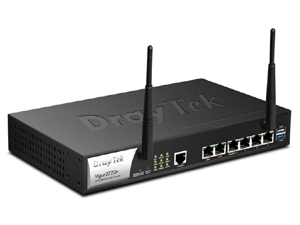
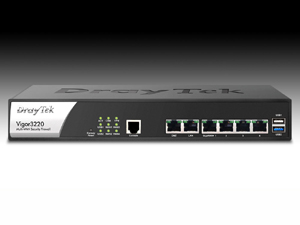
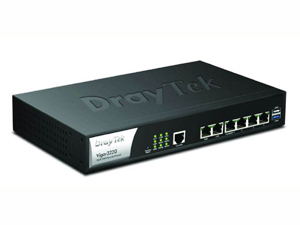
Draytek Vigor 3220 Wired, 4 x Gigabit WAN 2 x USB WAN, Load Balancer.
Draytek Vigor 3220N Wired & Wireless N, 4 x Gigabit WAN 2 x USB WAN, Load Balancer.
2 year nationwide back to base warranty.
Management Support
Central AP Management supports VigorAP 800, VigorAP 810, VigorAP 900, VigorAP 910C & VigorAP 902
Central Switch Management supports VigorSwitch G1241, VigorSwitch G2260, VigorSwitch P2261
Product Overview
- Quad-WAN: 4 x Gigabit Ethernet WAN ports
- 2 x USB ports (1 x USB 2.0, 1 x USB 3.0)
- Only USB port 2 (USB2) can be used for 3G/4G LTE mobile.
- USB port 1 (USB1) can be used for external storage, printer or thermometer.
- Multi-WAN Load Balance and Failover
- 100 x VPN and 50 x SSL-VPN tunnels with Load Balance and Redundancy
- 1 x Gigabit LAN port with 100,000 NAT sessions
- 1 x Dedicated Gigabit Ethernet DMZ port for connecting servers
- 1 x Console port (RS232)
- IEEE 802.11n Wireless LAN for Vigor3220n
- Object-based SPI Firewall with Content Security Management (CSM)
- IPv6 compliant
- QoS functions
- Central VPN Management
- Central AP Management
- Central Switch Management
- Supports Smart Monitor Traffic Analyser (up to 200 nodes)
- Supports Vigor ACS SI Central Management (TR-069)
The Vigor3220n Quad-WAN security Firewall router is an enterprise level router suitable for any medium-sized business (SMB) that need to provide up to 100 VPN tunnels.
The Vigor3220n router supports 4 x Gigabit Ethernet WAN interfaces and the USB port 2 (USB2) for 3G/4G mobile dongles.
The Vigor3220n can connect to the Internet through any of these interfaces, or with a combination of interfaces for Load Balance and/or Failover functions. It supports business features including an object-oriented SPI (Stateful Packet Inspection) firewall, IPv6, 100 VPN tunnels, 50 SSL VPN tunnels, tag-based VLAN, multiple subnets, etc.
The dedicated DMZ port can be used to connect servers or computers that need to be exposed to the Internet without compromising internal LAN security.
The Centralised network management features provide a convenient console for the network administrator. These features include Central VPN Management, Central Switch Management, and Central AP Management.
The Vigor3220n series router can be rack mounted, using the supplied mounting brackets, into a standard 19” rack or cabinet.
1. WAN Connectivity
The Vigor3220n router supports 2 types of WAN Interfaces: 4 x Gigabit Ethernet WAN interfaces, and the USB port 2 (USB2) for 3G/4G mobile dongles.
With between more than 1 WAN interfaces connected, you can configure for Load Balancing or Failover. For example, you can use WAN 1 as your primary Internet connection and have a failover connection over a 4G LTE connection.
2. LAN and VLAN
The Vigor3220n has 1 x Gigabit LAN port supporting 100,000 NAT sessions.
The Vigor3220n supports both port-based and 802.1q tagged VLANs. Port-based VLANs allow the assignment of a VLAN and IP subnet to each router LAN port. On the other hand, 802.1q tagged VLANs can extend up to 8 VLANs and 8 IP subnets to an attached switch.
3. Wireless LAN
The Vigor3220n has a built-in 2.4GHz IEEE802.11n wireless Access Point that provides good coverage and excellent Wi-Fi performance. The MIMO technology with diversified antenna arrangement minimises interference effects and ensures good wireless performance.
To match the business level features of Vigor3220 series, Vigor3220n supports all major Wi-Fi encryption protocols: WEP, WPA, WPA2 and 802.1X, plus MAC Address access control, and DHCP Fixing to prevent unauthorized accessing.
The Web-portal setup (log-in) provides four rules along with 4 SSIDs. Each of the 4 SSIDs can be created and assigned to a VLAN and IP subnet with separate security levels. The wireless VLAN function lets you isolate wireless clients from each other or from the “wired” LAN.
When users connect to the Wireless LAN, they can be directed with your customised log-in screen before any Internet access is permitted.
With WPS (Wi-Fi Protected Setup) feature, you can press the WPS button at the front of the router to pass on the security keys to a client PC in the LAN, allowing for easy and secured access to the Wireless LAN.
4. Quality of Service (QoS)
QoS functions allow the network administrator to set priorities for any traffic type to guarantee the required level of performance for data flow. For example, real-time traffic such as VoIP or Video over IP can be prioritised as these have less tolerance for delays caused by network congestion.
A traffic type can be assigned to each of the three QoS classes and reserved bandwidth allocated.
5. Firewall
The Vigor3220n has powerful firewall features including object-oriented SPI (Stateful Packet Inspection) firewall, DoS (Denial of Services), CSM (Content Security Management) and WCF (Web Content Filter).
Stateful Packet Inspection (SPI) Firewall monitors incoming and outgoing packets at layer 3 (OSI model) and passes or blocks the data packets based on the configuration.
The DoS feature protects the network for unwanted access requests from DoS attackers.
CSM enables network administrators to control and manage IM (Instant Messenger) and P2P (Peer-to-Peer) applications, for instance, to keep network users from accessing inappropriate contents and ensure that network traffic flow efficiently.
WCF classifies all websites into 64 categories and allows network administrators to select categories to protect the users from undesirable website content. DrayTek uses the CYREN WCF database for its Vigor routers, and each router includes a free 30-day trial license.
The object-based firewall provides flexibility by using Objects in the firewall settings. Objects can be created and placed in groups for IP, service type, keyword, file extension, etc. This allows a filter rule to be applied to many IP addresses, reducing the number of firewall filters required. In addition, these objects and groups can be reused for other firewall settings resulting in reduced amount of work required to create multiple firewall rules.
Firewall rules can be applied according to a Time Schedule to control access to the Internet or network services according to predetermined time slots. Up to 4 time-schedules can be applied to each firewall filter rule. For example, social media can be restricted during work hours and be allowed during off-work hours in a company.
6. VPN & SSL-VPN
Vigor3220n supports up to 100 simultaneous hardware based VPN tunnels, providing a throughput up to 40Mbps for each VPN tunnel. It utilises most supported protocols such as IPSec/PPTP/L2TP, and 50 tunnels of SSL VPN protocol. The dedicated VPN co-processor supports hardware encryption including AES/DES/3DES, hardware key hash of SHA-1/MD5, and LDAP authentication, and ensures that VPN traffic is secure and performance is maximised.
The SSL technology allows secure Web encryption such as those used for on-line banking. With Vigor3220n, you can create SSL VPN in Full Tunnel mode or Proxy mode.
Furthermore, since the Vigor3220n supports multiple WANS Ethernet and 3G/4G, you can create VPN Trunking for VPN Load Balance and VPN Backup. For instance, you can use a number of connections to a site to increase the bandwidth, or have a backup connection when the primary connection fails.
7. Central VPN Management
Instead of manual VPN connection through web browsers, Vigor3220n supports Central VPN Management (CVM) which utilises TR-069 protocol. You can create VPN tunnels with just a few mouse clicks on the icons representing your local network (which may be public places such as a café) and remote locations (e.g. branch or home office), and the router will establish the connection automatically. This takes away the tedious process required for VPN tunnel creation.
Furthermore, CVM also provide a console to monitor multiple CPE devices and VPN tunnels. This includes displaying the CPE devices on a Google Map.
Other features include scheduling of CPE configuration backup/restore tasks as well as scheduled firmware upgrade of the CPE devices. Up to 8 DrayTek CPE devices are supported.
8. Central AP Management
Vigor3220n supports Central AP Management (APM) with a console to auto configure and manage up to 20 directly connected (via LAN cables) Draytek wireless Access Points including VigorAP 800, VigorAP 810, VigorAP 900, VigorAP 902 & VigorAP 910C.
The Dashboard feature displays the status such as traffic and number of attached stations, of all the attached Access Points.
With Auto Provisioning enabled on the attached Access Points, WLAN profiles can be created and applied to the selected Access Points from the central console.
The AP Maintenance feature allows a number of actions to be programmed, including Configuration Backup and Restore, Firmware Upgrade, Remote Reboot and Factory Reset, for selected Access Points.
The connected Access Points can also be displayed on a map or floor plan showing their locations and basic descriptions. Other features include Traffic Graph, Rogue AP detection, Event Log, Total Traffic, Station number and Access Point load balancing.
9. Central Switch Management (New Firmware will be released soon)
Central Switch Management provides a convenient and easy way to manage and configure supported VigorSwitches. Switched networks comprising VigorSwitches can be easily deployed from a single console. With a few mouse clicks in the graphical user interface, VLANs can be assigned to the switch ports and at the same time update the router configuration. This includes the creation of 802.1q trunk ports.
Another feature is the backup and restore of switch configurations. You can also reboot the switch or reset the switch to factory default settings
The Switch Status menu provides, at a glance, the status of all the attached switches. You can see the switch name, its IP address, the model number and system up time, how many ports are in use in each switch, port status, how many clients are connected, etc.
Central Switch Management simplifies VigorSwitch configuration tasks and reduces troubleshooting efforts.
10. Remote Access Management
The Vigor3220n supports a number of management options to control access to the router both locally and remotely.
The TR-069 feature integrates with the VigorACS-SI centralised management system, and allow system integrators or network administrators to configure, monitor and manage the Vigor3220n remotely from the comfort of their offices or homes. It can also be used to Auto-Provision the Vigor3220n remotely by sending configuration data to the router.
There are 3 wizards: a Configuration Wizard, a VPN Wizard and a Firmware Upgrade Wizard. These allow network administrators to quickly and easily carry out complex tasks.
Alarm & Log Management features ensure real time notifications and alerts to specified phone numbers or email accounts in relation to faults or status of the connected CPEs.
A number of diagnostic functions, including Data Flow Monitor, Traffic Graph and Syslog Explorer, allow the network administrator to monitor and troubleshoot network conditions remotely.
Like all Vigor routers, Vigor3220n supports management options include HTTP, HTTPS, FTP, SSH, Telnet and SNMP.
11. Dedicated DMZ Port
The DMZ port of Vigor3220n router provides an additional layer of protection to servers, such as Web servers, which need to be exposed to outside networks e.g. the Internet, but need to be kept from compromising the security of internal networks.
You can activate the DMZ by NAT or Physical mode to the chosen server through the user-friendly interface of Vigor3220n router.
CONNECTIVITY
Ethernet WAN
IPv4
DHCP Client, Static IP, PPPoE, PPTP, L2TP, 802.1q Multi-VLAN Tagging
IPv6
Tunnel Mode: TSPC, AICCU, 6rd, Static 6in4
Dual Stack: PPP, DHCPv6 Client, Static IPv6
WAN Connection Failover
WAN Budget
Load Balance/Route Policy
Ethernet LAN
IPv4/IPv6 DHCP Server
Static Routing/RIP
Multiple Subnets
Port/Tag-based VLAN
USB
3.5G/4G LTE(PPP, DHCP) as WAN5/ WAN6
Printer Server/File Sharing
MANAGEMENT
System Maintenance
HTTP/HTTPS with 2-level Management (Admin/User)
Logging via Syslog
SNMP Management MIB-II (v2/v3)
CLI (Command Line Interface, Telnet/SSH)
Administration Access Control
Web-based Diagnostic Functionality
Firmware Upgrade via TFTP/FTP/HTTP/TR-069
CWMP Support (TR-069/TR-104)
LAN Port Monitoring
Network Management
Bandwidth Management by Session/Bandwidth
User Management by Time/Data Quota
LAN DNS and DNS Proxy/Cache
Dynamic DNS
IGMP Snooping/Proxy v2 and v3
QoS (DSCP/Class-based/4-level Priority)
Guarantee Bandwidth for VoIP
Support Smart Monitor (Up to 200 nodes)
Central AP Management
Central VPN Management
Switch Management
Security
Multi-NAT, DMZ Host, Port-redirection and Open Port
Object-based Firewall, Object IPv6, Group IPv6
MAC Address Filter
SPI (Stateful Packet Inspection) (Flow Track)
DoS/DDoS Prevention
IP Address Anti-spoofing
E-mail Alert and Logging via Syslog
Bind IP to MAC Address
Time Schedule Control
Content Security (IM/P2P, URL, Keywords, Cookies, etc.)
VPN
Up to 100 VPN Tunnels
Protocol: PPTP, IPsec, L2TP, L2TP over IPsec
Encryption: MPPE and Hardware-based AES/DES/3DES
Authentication: MD5, SHA-1
IKE Authentication: Pre-shared Key and Digital Signature (X.509)
LAN-to-LAN, Teleworker-to-LAN
DHCP over IPsec
IPsec NAT-traversal (NAT-T)
Dead Peer Detection (DPD)
VPN Pass-through
VPN Wizard
mOTP
Supports 50 SSL VPN Tunnels
VPN Trunk: VPN Backup and Load Balance
WLAN
802.11n with 2.4GHz
Multiple SSID
Encryption (64/128-bit WEP,WPA/WPA2,802.1x)
Hidden SSID
Wireless Rate Control by SSID
Wireless VLAN
Wireless LAN Isolation
MAC Address Access Control
Access Point Discovery
Wireless Client List
WDS (Wireless Distribution System)
WMM (Wi-Fi Multimedia)
Hardware Interface
4 x 10/100/1000Base-Tx WAN Port, RJ-45
1 x 10/100/1000Base-Tx LAN Switch, RJ-45
1 x 10/100/1000Base-Tx DMZ Port, RJ-45
2 x USB Host (USB1 is 2.0 and USB2 is 3.0)
2 x Detachable Antennas
1 x Console Port, RJ-45
1 x Factory Reset Button